Intro
- Attribute Directives 예시
- [ngClass]: add or remove css class
- [ngStyle]: styles html element
코드 예시
Goal: [ngClass], [ngStyle] 사용해 보자! 준비물: 새 프로젝트와 Component 하나
[ngClass]
Step 1:
src > app > my-first-component > my-first-component.component.ts
1
2
3
4
5
6
7
8
9
10
11
12
13
14
15
16
17
18
19
20
21
22
import { Component, EventEmitter, OnInit, Output } from '@angular/core';

@Component({
  selector: 'app-my-first-component',
  templateUrl: './my-first-component.component.html',
  styleUrls: ['./my-first-component.component.css']
})
export class MyFirstComponentComponent implements OnInit {

  public itemList!: any[];

  constructor() { }

  ngOnInit(): void {
    this.itemList = [
      {"name": "Lamp", "color": "Gold"},
      {"name": "Book", "color": "Blue"},
      {"name": "Kite", "color": "Red"},
      {"name": "Pear", "color": "Green"}
    ]
  }
}
- Component의 ts 파일을 연다 (src > app > my-first-component > my-first-component.component.ts)
Step 2:
1
2
3
4
5
6
7
8
9
10
11
.color-red {
    color:red
}

.color-yellow {
    color:yellow
}

.color-blue {
    color:blue
}
- Component의 css 파일을 연다 (src > app > my-first-component > my-first-component.component.css)
Step 3:
1
2
3
4
5
6
7
<ul *ngFor="let item of itemList">
    <li [ngClass]="{
        'color-red':item.name === 'Lamp',
        'color-yellow':item.name === 'Book',
        'color-blue':item.name === 'Kite'
    }">Item Color</li>
</ul>
- Component의 html 파일을 연다 (src > app > my-first-component > my-first-component.component.html)
Result
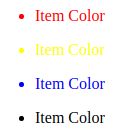
- Terminal에서
ng serve를 이용하여 브라우저에서 결과를 확인한다.
ngStyle
Step 1:
1
2
3
4
5
6
7
8
9
10
11
12
13
14
15
16
17
18
19
import { Component, EventEmitter, OnInit, Output } from '@angular/core';

@Component({
  selector: 'app-my-first-component',
  templateUrl: './my-first-component.component.html',
  styleUrls: ['./my-first-component.component.css']
})
export class MyFirstComponentComponent implements OnInit {

  public color!:string;
  public size!:number;

  constructor() { }

  ngOnInit(): void {
    this.color = "blue";
    this.size = 30;
  }
}
- Component의 ts 파일을 연다 (src > app > my-first-component > my-first-component.component.ts)
Step 2:
1
2
3
<div [ngStyle]="{'color':color, 'font-size': size + 'px'}">This is ngStyle</div>
<button (click)="size = size + 1">+</button>
<button (click)="size = size - 1">-</button>
- Component의 html 파일을 연다 (src > app > my-first-component > my-first-component.component.html)
- 위의 코드를 html 파일에 넣는다.
Result
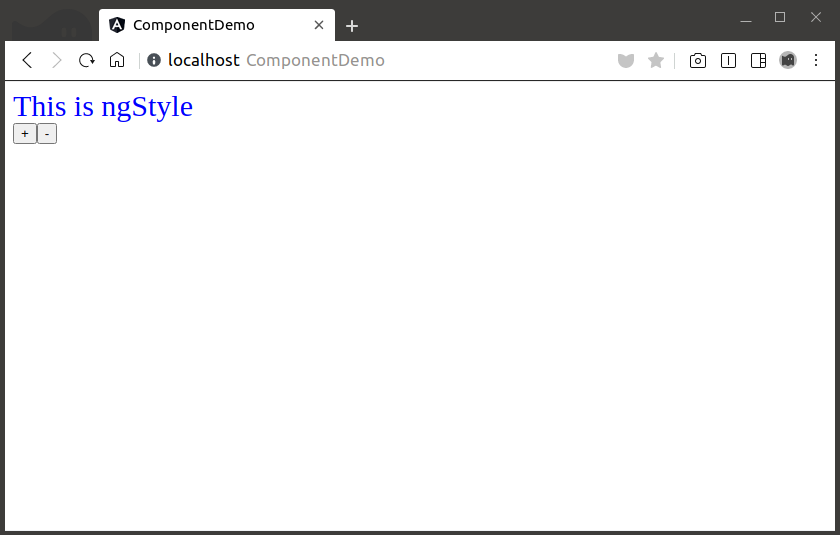
- Terminal에서
ng serve를 이용하여 브라우저에서 결과를 확인한다. - ’+’ 누르면 커지고 ‘-‘ 누르면 작아진다면 성공!
Custom Directives는 다음 포스트에서